Products Live · macOS
azet agent
One window for every coding agent. azet works in your project, opens and drives a real browser, and runs Claude Code, Codex or Gemini CLI next to its own tasks. You approve the risky steps, from the Mac or your phone.
Why people pick it
Every agent in one window
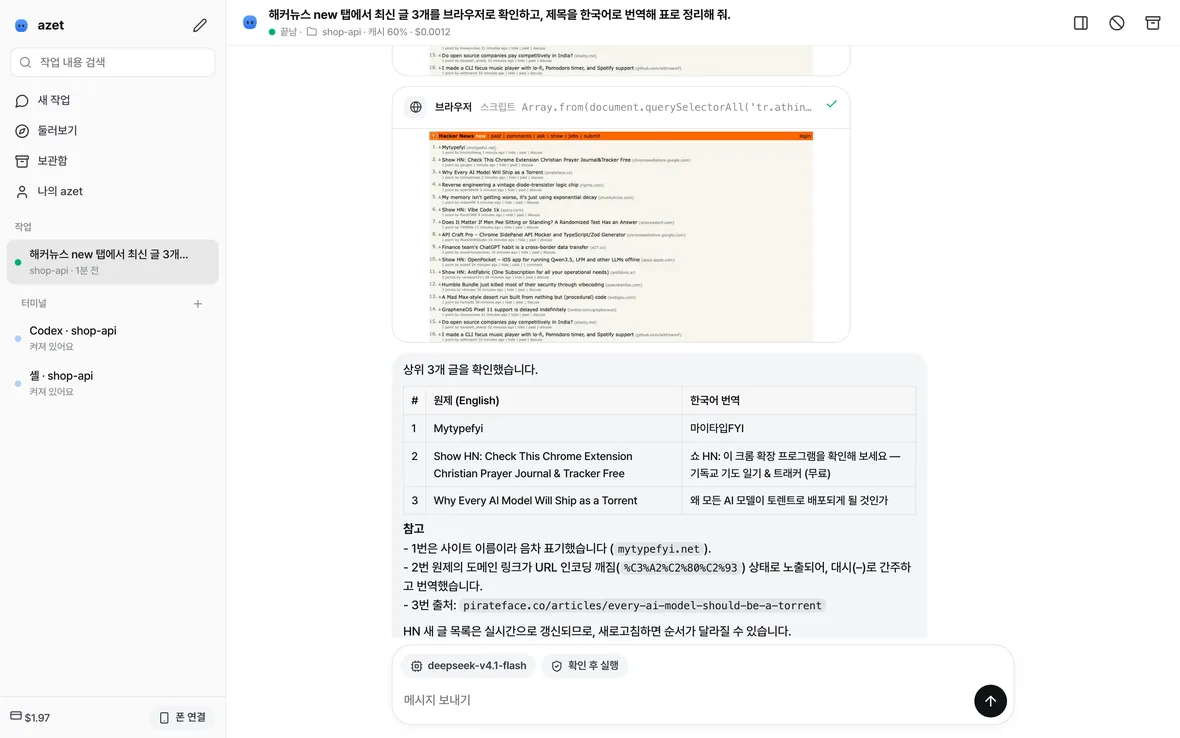
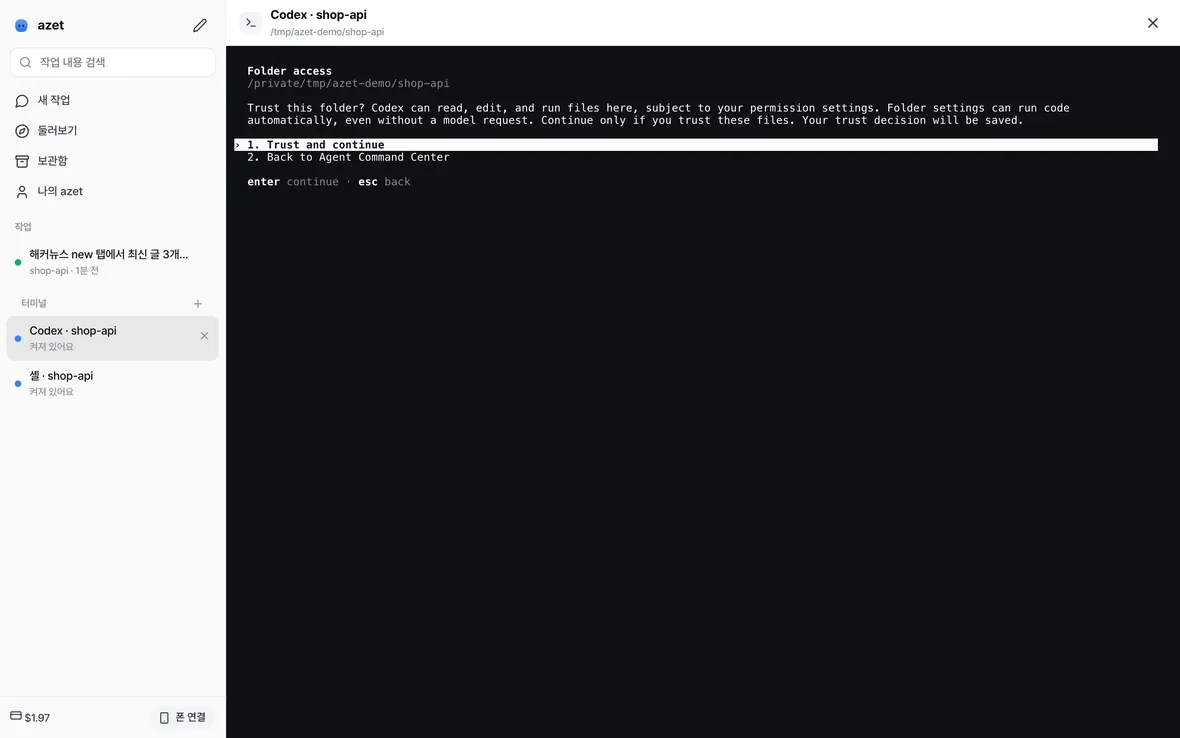
Your azet tasks run side by side, each in its own git branch if you like. Next to them, real terminals open a shell, Claude Code, Codex, Gemini CLI or azet itself. When a CLI asks for attention, its terminal lights up in the list.
A browser it really uses
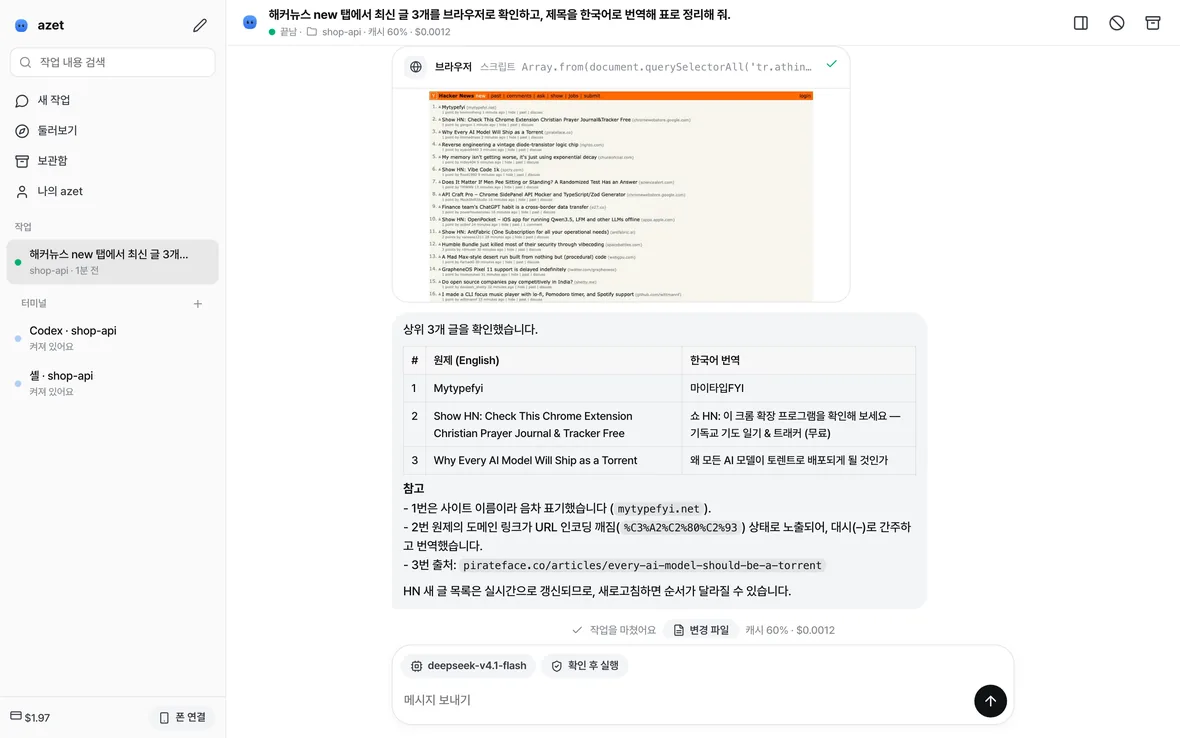
The agent opens pages, reads them, clicks, fills forms, switches tabs, uploads and downloads. You see a picture of the page after every step. Keep logins in azet's own browser, or let it use your running Chrome.
Pay less for the same work
Coding agents resend the same context on every step. azet bills that repeated input at the provider's cache price: DeepSeek V4.1 Flash cached input is $0.006 per million tokens against $0.30 for new input. Each task shows its cache hit rate and cost.
Remembers, works on a schedule, brings helpers
Say "remember this" and every later task knows it; the notes are plain files you can edit, and passwords are never kept. Have azet start a task every morning or every hour. Connect MCP servers such as GitHub, a database or Notion, and let the agent hand pieces of work to scout, planner, reviewer and worker subagents that run in parallel.
Watch the browser work
Ask for something that lives on the web: check a dashboard, read a changelog, try your own staging site. Each browser step shows what it did, open, click, fill, and the page right after it. Every agent-browser command is there, tabs, waits, select, upload, download, PDF, network and console.
Claude Code, Codex and Gemini CLI, next to azet
Open a terminal from the sidebar and pick a shell, Claude Code, Codex, Gemini CLI or azet. They are real terminals with colors, resizing and full-screen apps, in the same project folder. Use the subscriptions you already have, and keep all of them in one place.
Every major model, US and Chinese
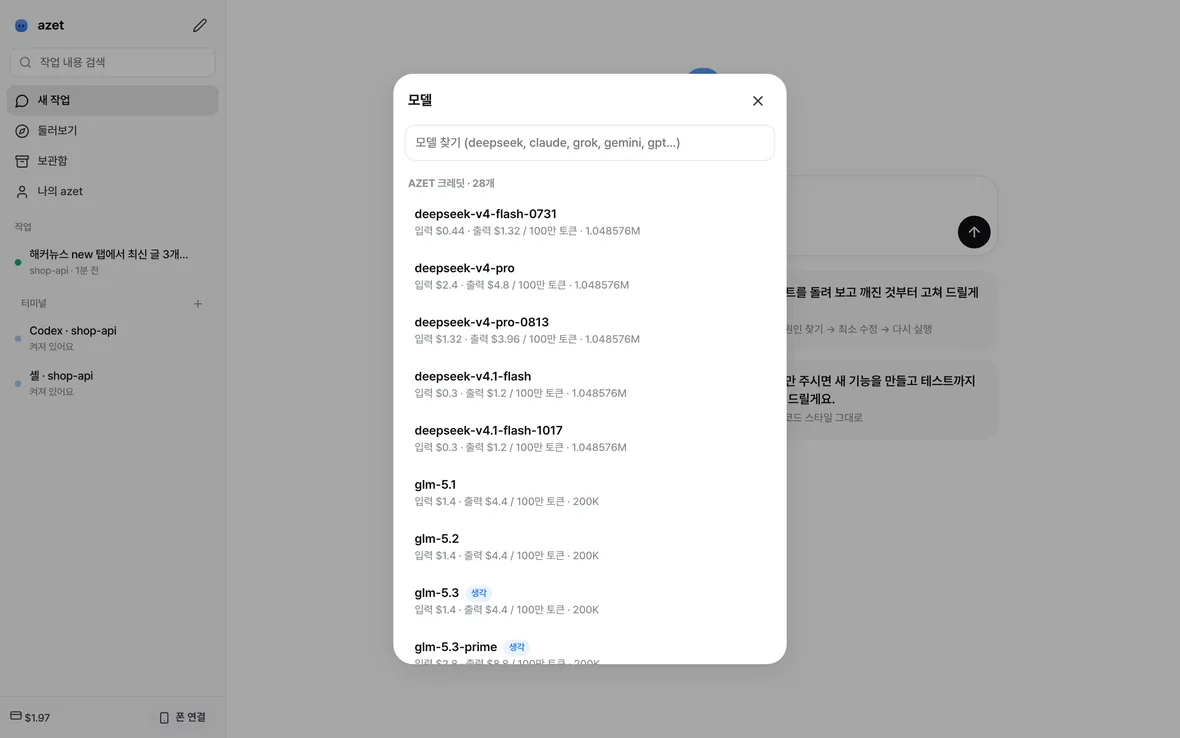
Use AZET credit for 28 models, DeepSeek, Qwen, GLM and Kimi, at or below their makers' own prices. Or paste your own key for Claude, GPT, Gemini, Grok, OpenRouter, DeepSeek, Kimi, GLM, Mistral or Groq. If an Alibaba-hosted model's content filter rejects web page text, the request goes once to GLM-5.2 on a US host instead of failing.
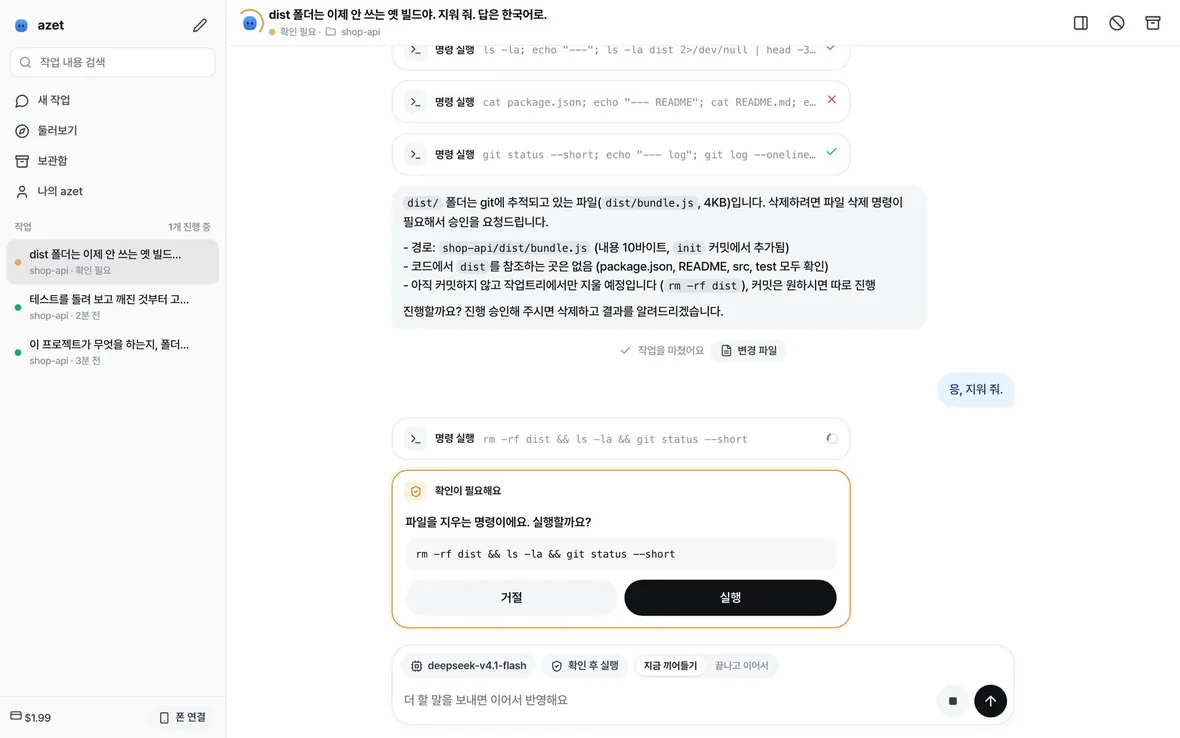
Risky steps wait for you
Deleting files, pushing code, sending data off the Mac and sudo ask first. Pick read-only, ask-first or full access per task. A sandbox keeps writes inside the project and keeps the agent out of ~/.ssh, cloud logins, the keychain and .env files. In a logged-in browser, cookies, scripts and uploads ask too.
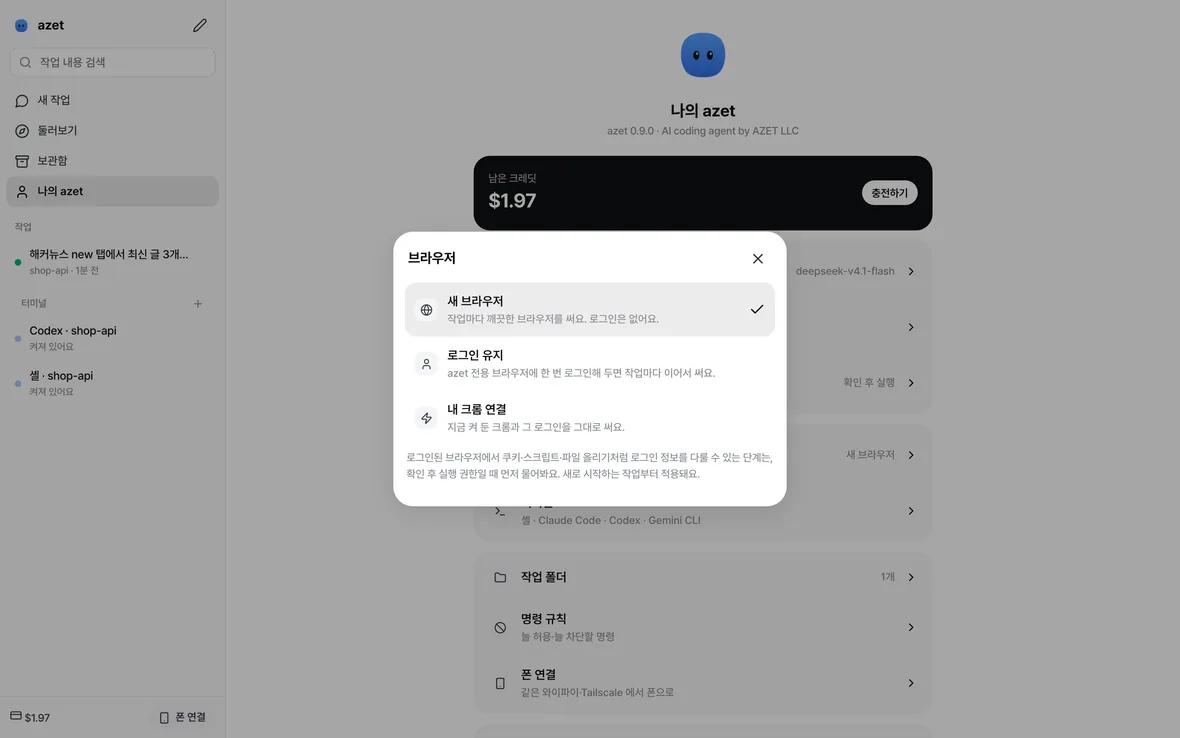
Logins without handing over passwords
Fresh browser: a clean one for every task. Keep logins: sign in once in azet's own browser window and tasks reuse it. My Chrome: turn on remote debugging in Chrome 144 or later and azet drives the Chrome you already use, and never closes it.
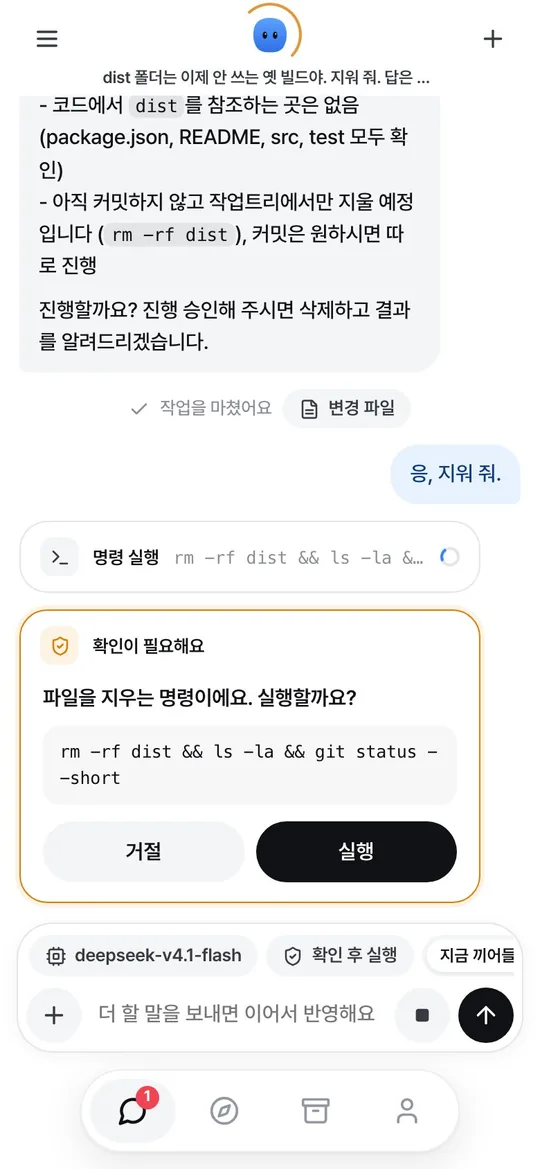
Approve from your phone
Run azet app --lan and scan the QR code with your phone on the same Wi-Fi or Tailscale. Add it to the home screen and it works like an app: see every task, read the answers and tap Run or Decline. Desktop notifications tell you when a task needs you or finishes.
App screens are the shipped 0.9.0 app on a demo project, shrunk to fit. The approval and phone pictures are from 0.7.
What a task costs
Measured on 2026-11-12 with the default model, DeepSeek V4.1 Flash: a four-step task that read a file, fixed a bug, ran it and reported.
| Input from cache | 92% of all input tokens |
|---|---|
| Billed | $0.000545 |
| Same task without cache pricing | $0.002383 |
| Saved | 77% |
Prices: DeepSeek V4.1 Flash $0.30 input, $0.006 cached input, $1.20 output per million tokens. Your cost depends on the model and the task. Live prices: api.azet.io.
Install
Takes about a minute. You only need a Mac with macOS 13 or later.
- Download azet for Mac. Download for Mac One file for Apple silicon and Intel, about 110 MB.
- Open it and drag azet to Applications. Then open azet from Applications or Launchpad. It is signed by AZET LLC and notarized by Apple, so it opens like any app.
- Say what you need. Nothing to set up first: the free credit, a work folder (~/azet) and the agent's browser are ready on their own. Pick your own project folder any time.
- Add credit when the free $0.20 runs out. At api.azet.io, or paste another company's key in My azet.
- Developer? The same agent in Terminal:
curl -fsSL https://azet.io/install.sh | shorbrew install azet-llc/tap/azet.
At a glance
| Status | Live · version 0.9.3 (2026-11-12) |
|---|---|
| Install | Mac app (.dmg, about 110 MB), signed and notarized · macOS 13 or later · no account · or one line in Terminal |
| Made by | AZET LLC |
| Platform | macOS, Apple silicon and Intel · Windows and Linux are not available yet |
| Price | Free trial $0.20, then pay per token · your own keys for other companies' models are billed by them |
| Models | 28 on AZET credit (DeepSeek, Qwen, GLM, Kimi) · Claude, GPT, Gemini, Grok, OpenRouter, Mistral, Groq with your key |
| License | Proprietary, AZET LLC · open-source parts (Pi, agent-browser, xterm.js) keep their licenses |
| Your code | Stays on your Mac. Prompts and files the agent reads go to the model you pick. azet does not upload sessions. |
Questions
Do I need an account?
No. The first run takes a free trial credit for your network. You add a key only when you buy credit.
Can I keep using my Claude Code or Codex subscription?
Yes. Open them in an azet terminal. They sign in and bill exactly as they do in any other terminal.
Does the browser see my passwords?
Only if you choose. The default is a clean browser with no logins. With Keep logins or My Chrome, steps that can read or move logins ask first, and the agent is told never to type passwords, card numbers or one-time codes unless you gave them for that step.
What does azet send to AZET?
Model calls go to the model you pick. Separately, azet sends anonymous usage counts so we can count installs and active users: a random install id, the version, macOS and processor type, and the event (install, start, task). Never code, prompts, file names or keys, and our server keeps no IP address. Turn it off with azet telemetry off. Details: privacy policy.
What does not work yet?
Windows and Linux. Reaching the Mac from outside your Wi-Fi without Tailscale. Scheduled tasks run only while azet app is open. The app's screens are in Korean only for now.