Products Beta
Sweep for Android
Blocks ads, trackers and known scam sites in your browsers and apps, on the phone itself. No certificate to install.

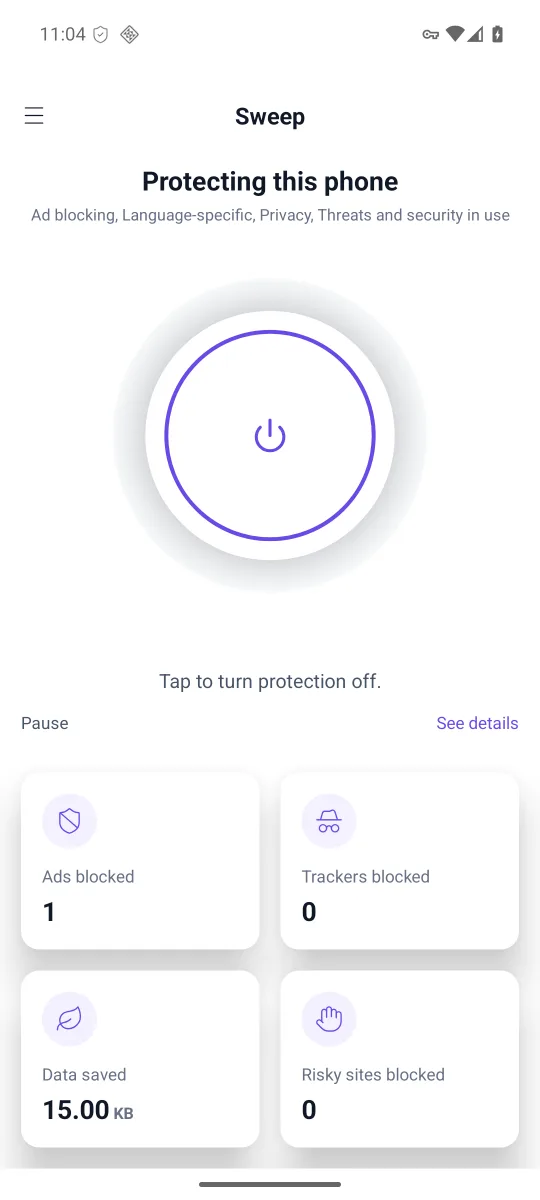
- AndroidBeta
- SafariBuilt, not released
- MacDownload
- WindowsDownload
Key features
Across apps and browsers
Every app’s connections pass through Sweep on the phone, and it checks the domain name each app looks up, so blocking is not limited to one browser. Ads served from the same domain as the content, as in some video and social apps, are not removed.
No certificate to install
Sweep never opens HTTPS traffic. There is no root certificate to add and nothing to set up per app.
Known scam sites
A list of about 200,000 known phishing hosts is refreshed daily. It stays on, free, after the trial.
Not routed through us
Your apps’ connections pass through a local VPN on the phone and leave from there as before. Your traffic is not routed through our servers, and your IP address is not hidden or changed. Lookups that are not blocked go to your network’s own DNS servers, the ones the phone would ask without Sweep, unless you pick a public resolver in the app.
No account, no card
Every list is on for 15 days. After that the app keeps running in its free tier. During the beta every trial runs until at least November 30, 2026.
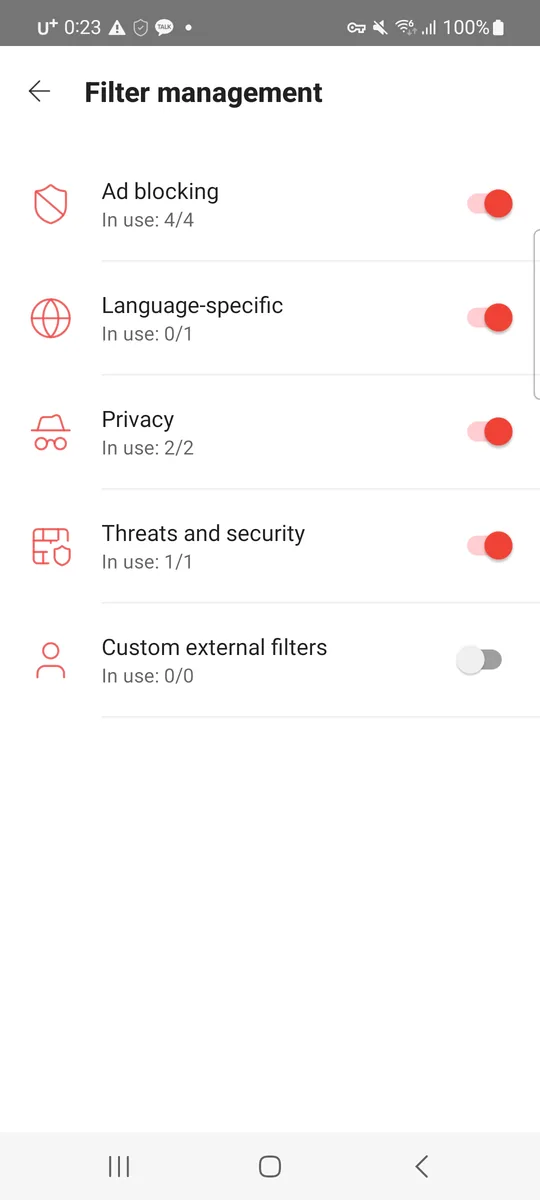
Choose what gets blocked
Filter management lists the groups, ad blocking, language-specific, privacy, and threats and security, each with its own switch and how many of its lists are in use. Your own blocked and allowed domains are in the side menu, and App management lets a single app skip the filter.
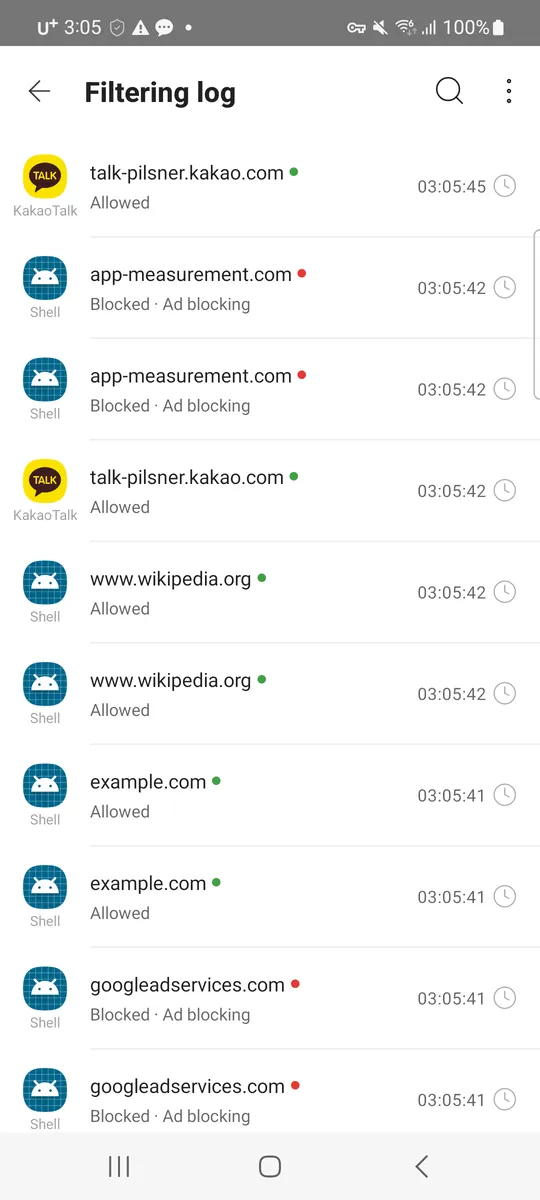
See what was blocked, and by which app
The filtering log lists each lookup as allowed or blocked, with the app that asked, the group that blocked it and the time. Search it, show blocked or allowed ones only, switch it off or clear it. It is kept in memory on the phone and is not sent to us.
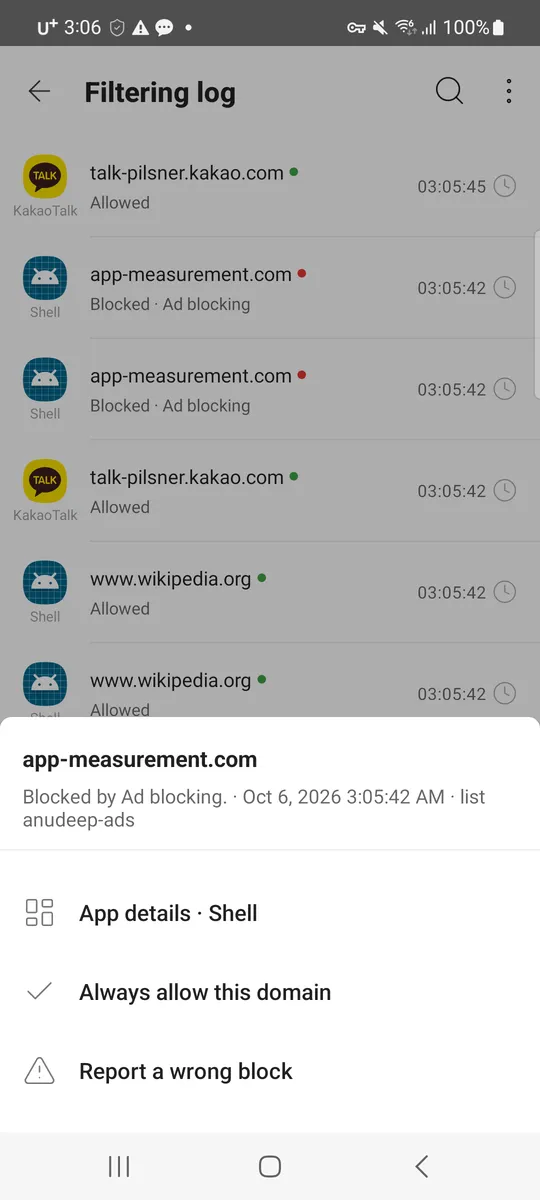
Fix a wrong block from the log
Tap an entry: its menu says which list blocked it and offers the app’s details, “Always allow this domain” and “Report a wrong block”. To pause for five minutes, long-press the app icon; protection comes back by itself.
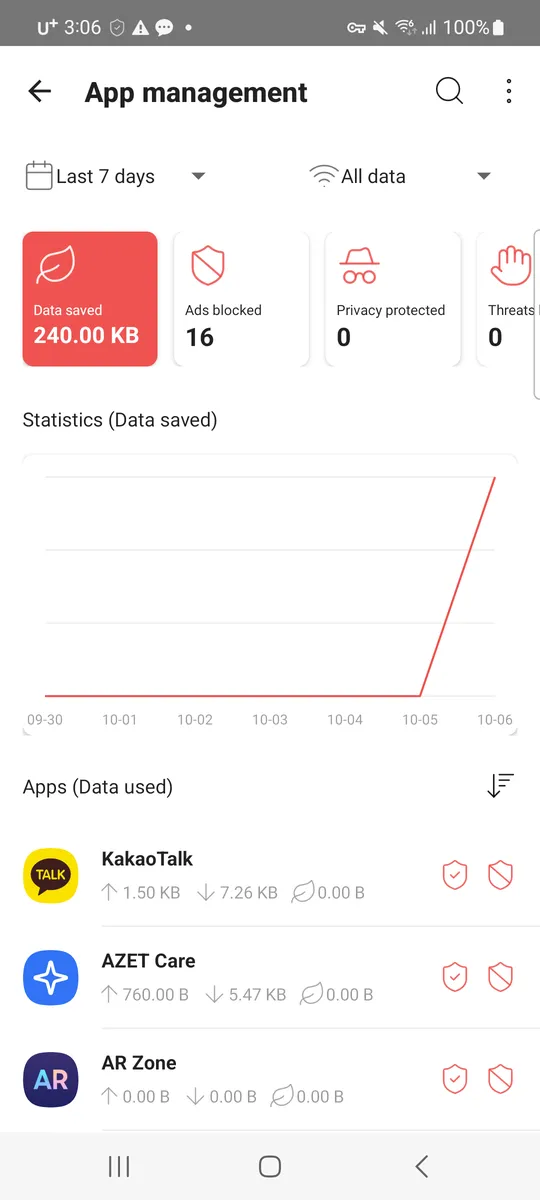
Each app, its data and its rules
App management shows, for today, yesterday or the last 7, 30 or 90 days and on Wi-Fi, mobile data or both, the data saved and what was blocked, then every app with what it sent, received and saved. Tap an app to let it skip the filter, keep its ads, or cut it off on Wi-Fi or mobile data. Apps installed from outside a store can be kept offline. Data saved is an estimate per blocked request.
Unretouched screenshots, resized. The main screen is version 0.6.3 on an Android emulator; the others are versions 0.5.0 and 0.6.0 on a Galaxy Note20, before the 0.6.3 redesign.
Install
Six steps. Android shows several warnings for any app from outside Google Play; this is what each one looks like and what to tap.
- Download. Tap the download button on this page in your phone’s browser. Chrome may warn that the file might be harmful; it can say this for an APK from outside Google Play, and on some phones no warning appears. If it does, choose the button that continues the download, not Cancel. Chrome may then say that Google Play Protect is already on; tap OK. Nothing was blocked.
- Open the file. A banner says the download is complete; tap Open on it. It disappears after a few seconds. If you miss it, open the browser’s menu and then Downloads, and tap the file. The first time, Android says your browser is not allowed to install unknown apps. Tap Settings and switch the permission on for that browser; on a Samsung phone this is a list of apps with a switch next to your browser, and the install window comes back by itself. You can switch it off again afterwards.
- Install. Android asks whether you want to install the app. Tap Install. A Samsung phone then shows one more warning, that the app is from an unknown source, with two choices; pick the one that installs anyway.
- Google Play Protect. Play Protect shows one of two screens. If it says “App scan recommended”, tap “Scan app”; when it says the app is safe, continue the install. If it says “App blocked to protect your device”, the main button, “Got it”, cancels the install: tap “More details” to expand the text, then “Install anyway”. If you are unsure the file is ours, check its SHA-256 below before installing.
The Google Play Protect blocked screen as it appeared on a Galaxy S8 (Android 9), drawn. Your phone may show the scan screen instead. - Open Sweep. The first screen says a few settings are needed. Tap “Get started”.
- Turn it on. The next screen, “Create a local VPN”, says what the app does on the device and what it never sends. Tap “Create local VPN”, then OK on Android’s connection request. This is a local VPN that stays on the phone; your apps’ connections pass through it so their domain names can be checked. On Android 13 or later, Android then asks whether Sweep may send notifications. A key icon in the status bar shows the VPN is on.
File details and SHA-256
| Version | 0.7.1 (beta) |
|---|---|
| Size | 17.6 MB (17,562,366 bytes) |
| Requires | Android 6.0 or later |
| SHA-256 | d31e01ce4daf044a167041bedb3c25d98ec2fd6e317ce3404d74fd1ba1217119 |
| Signed by | AZET LLC. Android refuses an update signed with a different key. |
| Open-source parts | Open-source notices |
To check the file on a computer: shasum -a 256 sweep-0.7.1.apk (macOS, Linux) or certutil -hashfile sweep-0.7.1.apk SHA256 (Windows) should print the value above.
Recorded on three phones: a Galaxy S8 (Android 9, Chrome 138), where Chrome showed no warning and Play Protect showed the blocked screen in English; a Galaxy Note8 (Android 9), where the 0.6.5 in-app update showed the scan screen; and a Galaxy Note20 (Android 13). The exact words differ by Android version, phone maker and language, and which Play Protect screen appears differs between phones and installs. The beta has been tested on that phone and on an Android 15 emulator, not yet on a wide range of devices.
Plans
Free to use today on Android: a 15-day trial without an account or a card, then the free tier. Buy a license below to keep the paid features.
Prices are in US dollars and may change; taxes may be added depending on where you live. Paid licenses bought on azet.io come with a 30-day money-back guarantee (refund policy). A lifetime license has no renewal charge and lasts for as long as AZET offers the product (details). The consumer apps are unlocked by a license key, not an account.
Sweep and other free browser blockers
| Sweep extension | Malwarebytes Browser Guard | DuckDuckGo extension | |
|---|---|---|---|
| Price | Free for trackers and scam sites; the ad-server list comes with a Sweep plan | Free | Free |
| Browsers | Chrome, Edge, Firefox, and Firefox for Android | Chrome, Edge, Firefox, Safari | Chrome, Edge, Firefox, Opera, and Firefox for Android |
| On the phone, in every app | Sweep for Android (beta APK) blocks in all apps | A separate app (Malwarebytes Mobile Security) | A separate app (the DuckDuckGo browser) |
Malwarebytes Browser Guard and DuckDuckGo as published on malwarebytes.com/browserguard and duckduckgo.com on October 16, 2026.
Other editions
- Sweep Shield for Google Play. The Google Play edition blocks known phishing and malware sites and trackers, and does not block ads, because Google Play does not allow an app to block ads in other apps. It is on Google Play as Sweep Shield Lite.
- Sweep for Safari. A content blocker for Safari on iPhone, iPad and Mac. It is built, but it is not on the App Store and has no release date.
- Sweep browser extension. For Chrome, Edge and Firefox on computers, and Firefox for Android. Tracker and scam-site blocking are free; a Sweep plan adds Sweep’s ad-server list. The Fire Button closes your tabs and clears the site data of the sites you visited in one click. Install it from the Chrome Web Store, Edge Add-ons or Firefox Add-ons.
- Sweep for Mac and Windows. A menu bar app on Mac and a tray app on Windows that filter the whole computer, not one browser. Released October 16, 2026: the Mac installer (0.1.28, 18.0 MB, macOS 12 or newer, Apple silicon and Intel, signed with AZET LLC’s Developer ID and notarized by Apple) and the Windows installer (0.1.30, 11.1 MB, Windows 10 or 11, x64, signed by AZET LLC). Before release each installer was run on a clean machine: it blocked ads and trackers for the whole system, gave every network its own DNS back when stopped, and uninstalled cleanly. Updates install from inside the app. A new Windows publisher builds SmartScreen reputation over time, so some PCs may show “Windows protected your PC” at first: choose More info, then Run anyway. SHA-256: Mac
96df644f7402a6f440f326cbc36dc66c4b6f74a311098b7b613f4fbc6da46bd6, Windows862be373cf6428528e2eb48e6f82b241e45a22de407eb56492ec80406b124dd6.
To be told when one of these is out, write to hello@azet.io; we answer once, when it is released.
Questions
What changed in 0.7.1?
Custom DNS now takes one encrypted server: an https:// address (DNS over HTTPS), a tls:// address (DNS over TLS) or an sdns:// stamp (DNSCrypt), and choosing a server applies at once. If the encrypted server cannot be set up, Sweep says so on that row and uses your network’s DNS meanwhile. The log, its search and App management show the company behind a blocked domain. A weekly block summary (Sunday evening, one notification, off in Settings) and an Errors notification channel are new: it tells you when the filtering engine fell back to DNS-only blocking or the lists have not updated for 3 days. Customer support has a Forum row that opens the public Sweep community on GitHub.
What changed in 0.6.5?
Licenses were not on sale yet at that version, so the upgrade sheet said so and offered no plans: the trial turns every list on and the dangerous-site list stays free afterwards. The data-saved card is marked as an estimate. Support mail goes to hello@azet.io.
What changed in 0.6.4?
A suspicious message can now be checked by AZET Nunchi, AZET’s own AI model. Share or paste the message into Sweep, tick the consent box and tap “Check for a scam with AI”: Sweep shows whether it looks like a scam, which kind, the signs it found and what to do. Only the text is sent, and only after you consent; it is not stored (see the privacy policy). Reporting the message stays a separate, optional step. Everything else works as in 0.6.3.
What changed in 0.6.3?
A new look. The main screen says above the power button whether protection is on, off or paused, and the counters are cards: ads blocked, trackers blocked, data saved and risky sites blocked. Settings, plans, the side menu and the first-run screens use the same cards, switches and buttons, and Korean text no longer breaks inside a word on Android 13 or later. Blocking works as in 0.6.2.
What changed in 0.6.2?
Sweep is now built for Android 16 (target API 36), which Google Play requires for new apps and updates. On Android 15 and 16 every screen keeps its layout under the status and navigation bars, Back while editing user rules or the allowlist closes the editor first, and the main screen's counters and the filtering log rows grow with large text instead of cutting the numbers off. Nothing else changed.
What changed in 0.6.1?
It fixes 0.6.0, which we withdrew on October 6, 2026: after Turn off or Stop for 5 minutes its connection stayed up without passing anything, so the phone had no internet until Sweep was force-stopped. Now turning off or pausing ends the connection at once. Also new: a Pause link under the power button with Stop for 5 or 10 minutes, and Activate hides the keyboard so the license key result is not covered. If you installed 0.6.0, install this version over it.
What changed in 0.6.0?
Every app’s connections now pass through Sweep on the phone, carried by firestack, an open-source engine (MPL-2.0) from Rethink DNS. The filtering log shows which app looked each domain up, App management shows each app’s data sent, received and saved by period and network, and each app can be cut off on Wi-Fi or mobile data. Also new: keep apps from outside a store offline, block ads in browsers only, DPI protection (on by default; the first packet of each secure connection is sent in pieces), custom DNS with a name and several IPv4 or IPv6 addresses, a check box for each user rule with select and edit all, and a Suspend shortcut on the app icon. The main screen’s third counter is now data saved. The download is larger, about 17.5 MB, because the engine is included. Nothing is decrypted and no certificate is installed.
What changed in 0.5.1?
Several messages and labels have new wording, written by us. User rules and the allowlist now have a search and a “Remove all” that you can undo for a few seconds. The About screen’s header is centred.
What changed in 0.5.0?
A new layout. A side menu holds every page; the main screen has a round power button and four counters (ads, privacy, user rules, threats), with See details opening App management and its seven-day chart. Filter management, Sweep settings, Updates and Customer support are pages of their own. Each filtering log entry has a menu to always allow or block the domain, or to report a wrong block; the “Something not loading?” sheet is gone. Blocking counts in the notification are now a switch in Sweep settings, off by default. Tasker automation is there too, off by default.
What changed in 0.4.1?
More lists, from open sources we name: AdAway, Anudeep's list and EasyList for ads, EasyPrivacy for trackers, and YousList for Korean sites (on by default when the phone is set to Korean). Each list shows where it comes from and its licence under Protection. The License screen now lists the devices on your license and lets you release one; when every device is taken, the list opens right under the key field. Also fixed: on the first run two list updates could overlap and leave one list missing; the app now fetches a missing list again.
What changed in 0.4.0?
It fixes a bug in 0.3.0: changing the system theme (light or dark), rotating the screen or changing the font size while the app was open could switch every protection list off, along with automatic list updates and start with the device, while the app still said Protected. After updating, the app puts those switches back if it finds exactly that picture; please open Protection once and check your lists. Also new in 0.4.0: the Overview says “Not filtering” whenever nothing is actually being blocked, lookups go to your network’s own DNS servers by default, a two-tap fix for a wrong block, a per-app switch, a five-minute pause inside the app, and seven-day totals.
Is Sweep on Google Play?
The full edition is not. Google Play policy does not allow an app to block ads across other apps, so the full edition is a signed APK from azet.io. A Google Play edition, Sweep Shield, blocks known phishing sites and trackers only and does not block ads. It is on Google Play as Sweep Shield Lite.
Is it a VPN? Can it see my traffic?
It uses Android’s VPN permission to set up a local VPN on the phone. Your apps’ connections pass through it on the phone: it reads the domain name, the app and the amount of data, checks the name against its lists, and sends the rest out as before. Lookups that are not blocked go, as ordinary unencrypted DNS, to the DNS servers of the network you are on (your carrier or Wi-Fi). In Sweep settings, Change DNS server, you can pick a public resolver instead or enter one encrypted server (https:// for DNS over HTTPS, tls:// for DNS over TLS, sdns:// for DNSCrypt); lookups to an encrypted server are sent encrypted. It is not a remote VPN, your traffic is not routed through our servers, it does not hide your IP address, and it does not open HTTPS traffic. The app does not send us the sites you visit. What it does send is listed in the privacy policy.
What does it not block?
Sweep blocks by domain name. An ad served from the same domain as the content around it, as some video and social apps do, is not removed.
What happens after the 15 days?
The app keeps working in its free tier with the dangerous-site list. License keys cannot be bought yet. Paid licenses bought on azet.io will come with a 30-day money-back guarantee (refund policy).
Why did blocking stop?
Android allows one VPN at a time. If another VPN app takes over, Sweep stops and tells you. If Private DNS is set to a provider hostname in Android settings, lookups bypass Sweep; the app shows a notice when it detects this.
How do updates arrive?
The app checks this site for a newer version and shows an Update button. Before anything is downloaded it tells you which Android warnings to expect. It then downloads the file, verifies its size and SHA-256, and only then opens Android’s installer. Protection turns itself back on after the update.
Does anyone pay to be unblocked?
No. There is no “acceptable ads” program. The lists come from open projects and are shown in the app with their sources and licenses.
What about iPhone, Mac and Windows?
Mac and Windows: the installers are under Other editions on this page. iPhone and iPad: Sweep for Safari is not on the App Store. AZET One will cover Sweep and the AZET Care apps under one license.
How do I remove it or get help?
Uninstall it like any other app. Found an ad Sweep missed, or a page it blocked by mistake? Report it here, or write to hello@azet.io. Sweep is operated by AZET LLC under the terms of service.
Try Sweep on your Android phone.
Download APK15-day trial, no account or card