Products Beta
AZET Pass
Keep every password and two-step code in one vault that is encrypted on your device, and share the logins your family, your team or an AI agent needs without pasting them into a chat. AZET Pass is the open-source Bitwarden app, built from source and connected to our server, with authenticator codes on the free plan.
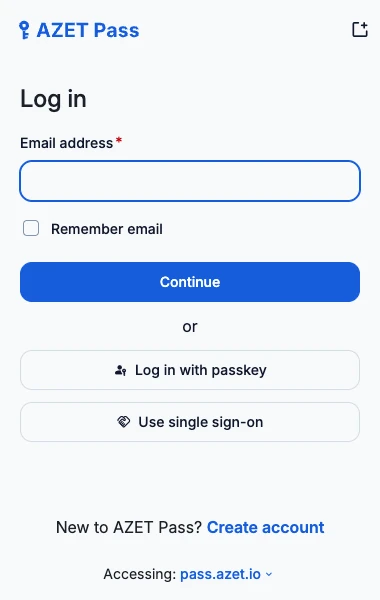
Why people use it
One master password instead of reused ones
Each login gets its own generated password, and its six-digit code sits next to it. You remember one master password; the app and the browser extension fill in the rest.
Share a login without sending it in a chat
Create a shared vault at pass.azet.io/team and invite up to four other accounts by link. A shared login is encrypted on your device with the vault's key before it is stored. A member receives that key only after the two of you compare a 20-character fingerprint.
An AI agent gets its own account, with an end date
An agent that deploys code or runs errands for you signs in with its own account and the Bitwarden command-line client. It receives only the vault you invited it to, and you can make it read-only. Set its access to end after 1 to 365 days, or turn it off in one tap.
A log of what the agent did, checked on your device
Each time an agent account receives, changes or deletes a shared login, the server writes a record. The records are chained with SHA-256, and your browser checks the chain against a note encrypted with the vault's key, which our server does not hold. A record that was removed or altered shows up as a warning.
What it does today
End-to-end encrypted vault
Logins, cards, identities, notes and passkeys are encrypted on your device with a key made from your master password. Our server stores and syncs only the encrypted vault; it never receives your master password or the key.
Free authenticator codes
Add a TOTP secret to a login and the app shows the six-digit code with its countdown, and can copy it after autofill. In Bitwarden this needs Premium; in AZET Pass it is on the free plan.
Autofill, generator and Send
Android autofill and the passkey provider, a password and passphrase generator, and Send for sharing text with an expiry date: the same features as the Bitwarden app.
Open source
The apps are Bitwarden's GPL-3.0 source with our name, icon and server address; the server is our MIT-licensed Cloudflare Worker. All of it is on GitHub, with the build scripts. The repository meets the OpenSSF Best Practices passing criteria (self-certified, October 2026).
Where your vault lives. pass.azet.io runs on Cloudflare Workers with a D1 database. It holds your email, a hash of your master password hash (never the password), the encrypted vault and, if you add one, the license key. Website icons are fetched through our server so the sites do not see your IP address. Details are in the privacy policy.
Source code. AZET Pass for Android, the browser extension and the web vault are free software under the GNU GPL version 3. The exact source of this APK, our changes and the build steps are at github.com/azet-llc/azet-pass (release v2026.11.0-azet1). AZET Pass is not made or endorsed by Bitwarden, Inc.
Updates. This APK does not update itself. A new version is posted on this page and on the GitHub release with its SHA-256 checksum.
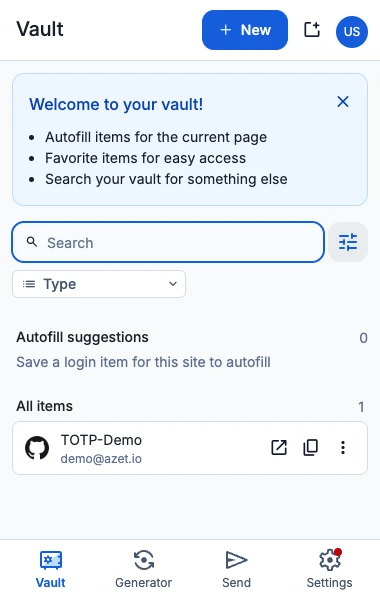
Vault
Search, filters by type and folder, and the logins that match the site you are on. Everything shown is decrypted on your device.
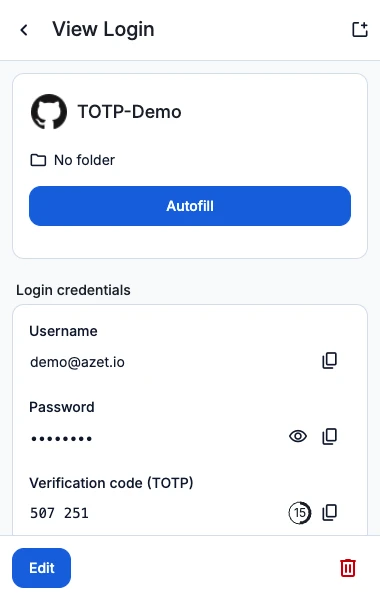
A login with its authenticator code
The verification code and its countdown sit under the password on the free plan. Copy it with one tap.
Unretouched screenshots of the AZET Pass browser extension (the same vault as the Android app) with a demo account, resized.
Not yet
- Safari. AZET Pass for Safari (Mac) is not on the App Store yet; this page will link to it once it is.
- iPhone. The iPhone app is not on the App Store yet.
- Windows SmartScreen. The Windows installer is signed by AZET LLC, but a new publisher builds SmartScreen reputation over time, so some PCs may still show “Windows protected your PC” at first. Choose More info, then Run anyway; the publisher shown is AZET LLC.
- Mac: Intel and Touch ID. The Mac app is for Apple silicon only, and unlocking with Touch ID does not work in it yet; unlock with your master password or a PIN.
- Chrome extension. Not in the Chrome Web Store yet. The browser extension is on Edge Add-ons and Firefox Add-ons.
- Google Play. Google Play has AZET Pass Lite, the Google Play edition, without accessibility-based autofill. The full app is the APK on this page, built for 64-bit ARM phones only.
- Larger teams. A shared vault holds five accounts. Vaults with more seats are not on sale yet.
AZET Pass, Bitwarden and 1Password
| AZET Pass | Bitwarden | 1Password | |
|---|---|---|---|
| Free plan | Yes, with no time limit | Yes, always free | No: a 14-day free trial |
| Authenticator codes | On the free plan | With Premium | No free plan |
| One person, per year | $18.99 | $19.80 (Premium) | $35.88 ($2.99 a month billed yearly, first-year offer; $3.99 a month regular) |
| Family, per year | $45.99, 6 accounts | $47.88, 6 users, unlimited sharing | $53.88 ($4.49 a month billed yearly, first-year offer), 5 users |
Bitwarden and 1Password plans and prices as published on bitwarden.com/pricing and 1password.com/pricing on October 16, 2026, in US dollars before tax. AZET Pass is not made or endorsed by Bitwarden, Inc.
Plans
The free plan has no time limit and can be used today in the web vault and the Android app. Premium is unlocked by an AZET license key: buy one below and enter it in your account.
Prices are in US dollars and may change; taxes may be added depending on where you live. Paid licenses bought on azet.io come with a 30-day money-back guarantee (refund policy). A lifetime license has no renewal charge and lasts for as long as AZET offers the product (details). AZET Pass Premium is added to your pass.azet.io account with a license key. The Family plan covers six accounts; shared vaults between them are not available yet.
Questions
Is AZET Pass free?
Yes. The free plan has no time limit: unlimited passwords and devices, end-to-end encrypted sync, and authenticator codes. Premium is added to an account with a license key.
How is it related to Bitwarden?
AZET Pass is built from Bitwarden’s open-source apps (GPL-3.0) with our name, icon and server address, and syncs with our own server at pass.azet.io. A Bitwarden account does not sign in to AZET Pass; you create an AZET Pass account. AZET Pass is not made or endorsed by Bitwarden, Inc.
What if I forget my master password?
We cannot reset it or open your vault: the vault is encrypted with a key made from your master password, and our server never receives either. Keep the master password somewhere safe.
Is there a free trial of Premium?
No. The free plan has no time limit, so there is nothing to run out.
Can my family or team share passwords?
Yes. One account creates a shared vault at pass.azet.io/team and invites the others by link; a shared vault holds five accounts, the organizer included. Members see the shared logins in their own web vault. The organizer can also help a member who is locked out back into their account, which is the one exception to “nobody can reset your master password”.
Can an AI agent use my logins?
Yes, through an account of its own. Add an AI account on the team page, run the join command on the machine where the agent works, and confirm the fingerprint it prints. The agent then reads the shared vault with the Bitwarden command-line client. A value the agent has already read cannot be taken back, so change those passwords after you turn its access off.
Where can I use it today?
On Android (the APK on this page), on a Mac with Apple silicon (the notarized app), on Windows 10 and 11 (the signed installer), in the web vault at pass.azet.io, and in Edge and Firefox. The Chrome extension and the iPhone app are listed under Not yet.
At a glance
| Status | Android: beta APK from azet.io · Mac: notarized app for Apple silicon · Windows: signed installer · web vault at pass.azet.io · free plan without a time limit |
|---|---|
| Operated by | AZET LLC |
| Platforms | Android 10 or newer, 64-bit ARM (APK from azet.io) · web vault at pass.azet.io · browser extension on Edge Add-ons and Firefox Add-ons · macOS 12 or newer on Apple silicon (notarized app on GitHub) · Windows 10 or 11, x64 (signed installer on GitHub) · iPhone and the Chrome extension not released yet |
| Android file | 2026.11.0-azet1 · 27,298,788 bytes · SHA-256 4a96749349f9e13935706594aa3c39870849d84dacaae9ba3a762d8720e71c95 |
| Mac file | 2026.10.4 · 195,850,441 bytes · SHA-256 a4e099491915b5758c66203acb014fec582ecf4b334c9785e5de98f0c87ce3c1 · source for this build on the same release page |
| Windows file | 2026.10.4 · 157,118,624 bytes · SHA-256 5916c04c3e17845fa7445a26b2972047c07b9dfa5bf0cdc4646634d8ab6958b9 · source for this build on the same release page |
| Source | github.com/azet-llc/azet-pass · GPL-3.0 (apps), MIT (server) |
| Account | An account on pass.azet.io (email and master password). A license key entered in the web vault adds Premium to that account; when it ends, the account goes back to the free plan. |
| Free trial | None: the free plan has no time limit |
| Terms and refunds | Terms of service · Refund policy · Privacy policy |
| Help | hello@azet.io |
| Open-source parts | Open-source notices |
Install AZET Pass on your Android phone.
Download for AndroidAndroid: beta APK from azet.io · Mac: notarized app for Apple silicon · Windows: signed installer · web vault at pass.azet.io · free plan without a time limit